
How to Renew an SSL Certificate for Your Website

Table Of Contents

In today’s digital world, SSL certificates are more than just a security layer; they are essential for building trust with your audience and maintaining website credibility. If your SSL certificate is about to expire, you need to renew it in time to avoid downtime, security risks, and potential search engine ranking issues.

In this guide, we will walk you through everything you need to know about renewing an SSL certificate, step by step.

What Is an SSL Certificate Renewal?

An SSL certificate renewal is the process of extending your website’s SSL validity once the old certificate is about to expire. Just like your passport or driving license, an SSL certificate has an expiry date. If not renewed, your website will:

  • Display browser warnings (like “Not Secure”).
  • Lose encrypted communication.
  • Potentially harm your SEO rankings.

That’s why it’s crucial to renew before expiry.

Why Is SSL Renewal Important?

SSL certificates don’t last forever. Here’s why timely renewal is important:

  1. Maintains Security: Protects sensitive data such as login credentials, personal information, and payment details.
  2. Builds Trust: Keeps the padlock symbol visible, ensuring visitors feel safe on your website.
  3. Avoids Downtime: Prevents disruptions in website functionality caused by expired SSL.
  4. Boosts SEO: Search engines like Google prioritize websites with valid SSL certificates.

Step-by-Step Guide: How to Renew an SSL Certificate

Renewing your SSL certificate is simple when done correctly. Follow these steps:
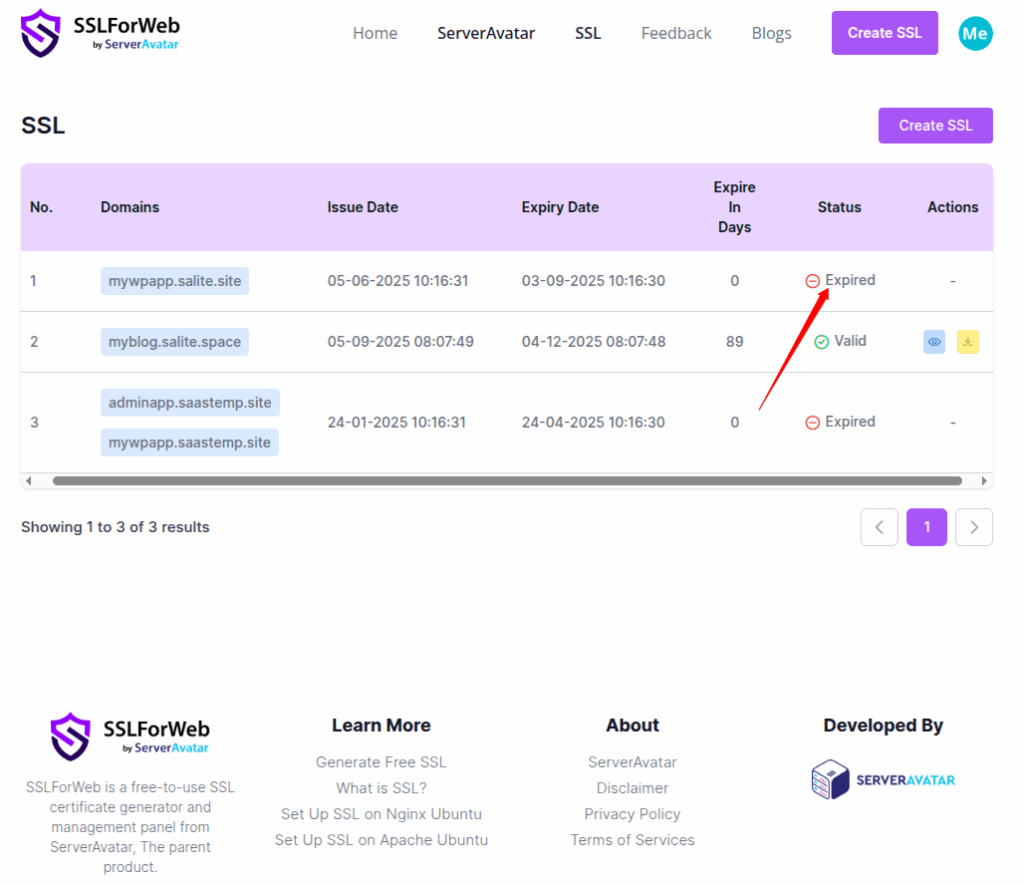
  • Navigate to the SslForWeb. In the SSL section, you can see the total number of SSL certificates that you generate, with the expiry date and the status, as you can see in the image below.
SSLForWeb
SSLForWeb is a free-to-use SSL certificate generator and management panel from ServerAvatar, The parent product.

Developed By

Copyright © 2025 SSLForWeb

Made with 💜 in INDIA 🇮🇳